Skip to content

a kanban board that lets you leave the desk

Ship from a walk

Squad33 is a kanban board that runs on your own Mac. Every ticket on it goes to Claude Code or Opencode — on the subscription you already pay for.

Pair your phone and the board fits in your pocket. Plan, queue and review by voice — hands free, from wherever the path goes.

A stick figure walks up a sunny hill path with earbuds in, saying “let’s add a button to the nav. file a ticket for it, and move it to ready.” A small bubble from the phone in their back pocket replies “Filed. In ready.”let’s add a button to the nav.file a ticket for it,and move it to ready.Filed. In ready.

Introducing vibewalking.

  1. Mid-afternoon at a desk. A tired stick figure hunches over a laptop on a stool, still typing a long prompt — “…and the tests, and the docs, and the copy… and also…” — with a red “Ouch!” pointing at their lower back. The laptop replies: “Cooking that for the next 12 minutes… Meanwhile, enjoy multitasking in other sessions.”> add the export button,then the modal, the tests,the docs, the changelog,the i18n strings, and theonboarding copy, and ▮Ouch!…and the tests,and the docs, andthe copy… and also…Cooking that for thenext 12 minutes…Meanwhile, enjoymultitasking in othersessions.

    Eight hours in the chair. The agent cooks, you multitask…

  2. Daytime. The laptop on the desk shows a kanban board and says “2 running.” The stick figure, phone in hand, walks toward an open door with sunlight on the floor; the phone says “Paired!”2 running.Paired!

    Phone paired. Get outside…

  3. Outside, the stick figure walks through a park with earbuds in, asking “does the date picker handle time zones?”. The phone in their pocket answers “It does not. Filing #14 to fix it?”does the date pickerhandle time zones?It does not.Filing #14 to fix it?

    Plan the next features on a walk…

vibe·walk·ing/ˌvaɪb ˈwɔː.kɪŋ/verb

1.Building software while walking around.

2.What a coding agent frees you for, once something else is pressing Enter.

meanwhile, at home

What happens while you’re out?

The Squad33 worker picks up whatever you put in ready and drives Claude Code or Opencode to implement it.

The Squad33 board: tickets across Backlog, Ready, In progress, In review, Blocked and Done.

One ticket, one worktree, one pull request.

  1. 1.Move it to ready

    Write the ticket on the board, on the phone, or from any Claude session through MCP. Drag it to ready. That is the whole hand-off.

  2. 2.A worktree of its own

    The worker checks out task/8-offline-queue-for-edits under ~/.squad33/worktrees/, branched from a fresh origin/HEAD.

  3. 3.The agent runs

    Claude Code or Opencode, headless, on your subscription. Every event it emits streams to a run log you can read from the phone while it works.

  4. 4.A pull request

    New commits are pushed and a PR opened with gh. The ticket lands in in_review, and the review is yours — on the bench, on the walk, or back at the desk.

  5. 5.Done

    done squash-merges the PR, deletes the branch and removes the worktree. Anything forked off that branch is queued for a rebase. Nothing reaches main without you.

  6. 6.Cancel, or blocked

    Cancel kills the run, tears the worktree down and puts the ticket back in backlog; the run log stays. A run that gives up marks the ticket blocked and keeps its worktree and session, so moving it back to ready resumes where it stopped.

A git diagram: main runs left to right. task/8-offline-queue branches off, gathers commits, opens a pull request and is squash-merged back. task/7-route-map-cluster-markers branches off later and is still running.mainsquash-merged, worktree gonetask/8-offline-queue-for-editsPRtask/7-route-map-cluster-markersrunning…

Each branch is checked out in its own folder, so two tickets never share a working tree — and neither shares yours.

the only screen you carry

Pair your phone, then leave.

  1. Install the desktop app

    One .dmg. It brings the board, the worker and the tunnel with it, and everything it runs stays on your Mac.

  2. Scan the QR code

    Scan the QR code. Your phone gets its own key to your Mac over a secure tunnel — no port opened at home, revocable in one tap.

  3. Go outside

    Earbuds in, phone in your pocket. Ask what is on the board, queue tickets, file new ones, answer the agent.

Talk, don’t type.

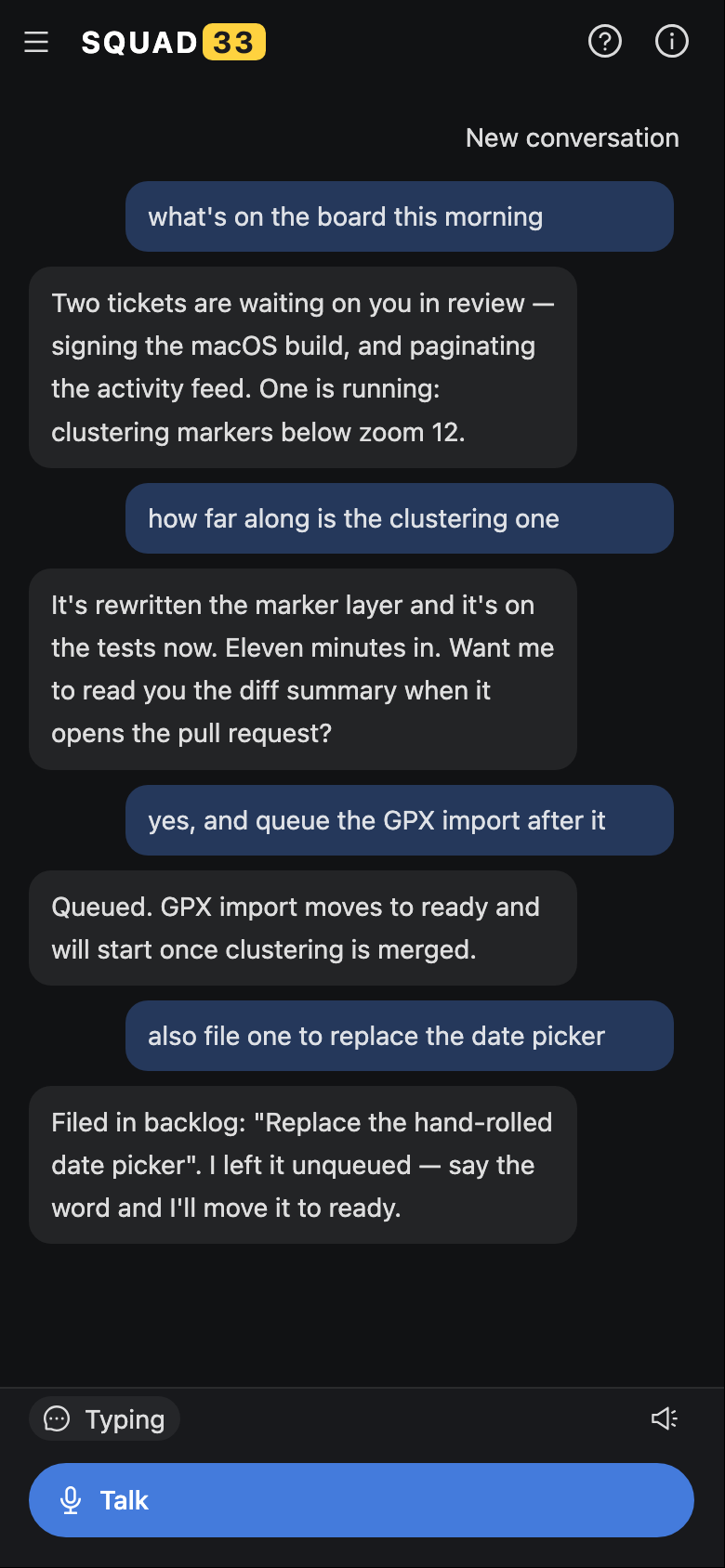
Whisper runs on the Mac by default, so what you say stays there. The reply is read out by the phone. Things people have actually said to it:

  • what’s on the board this morning
  • how far along is the clustering one
  • queue the GPX import after it
  • file one to replace the date picker
Voice mode on a phone: a conversation about what is on the board, how far a run has got, and a ticket queued behind another.

FAQ

Is vibewalking a real word?
It is now. Vibe coding is describing the software and letting the agent type; vibewalking is doing that while walking around, with the agent on a board that does not need you in the room.
Can I use my subscriptions?
That is the only way it works. Squad33 ships no model access of its own — it drives the Claude Code or Opencode you have already installed and signed in, on whatever you are already paying for. Without one, the app opens and can do nothing.
Does my code leave my machine?
Only where your coding agent already sends it. The board and the database are local files, and voice is transcribed on the Mac. The one addition is optional: Settings can route transcription to OpenAI Whisper instead of the local model.
How many tickets run at once?
Two by default, and it is a setting.
What happens when a run goes wrong?
Cancel kills the process, tears the worktree down and puts the ticket back in backlog. The run log stays, so you can read what it did before deciding what to change in the ticket.
Why does my phone reach my laptop through your tunnel?
So you do not have to open a port. The tunnel carries traffic to your Mac; it does not hold your board.
What does it cost?
Nothing during the beta. A paid version is planned after it.